
Frontlines
Last updated: 2026-03-12
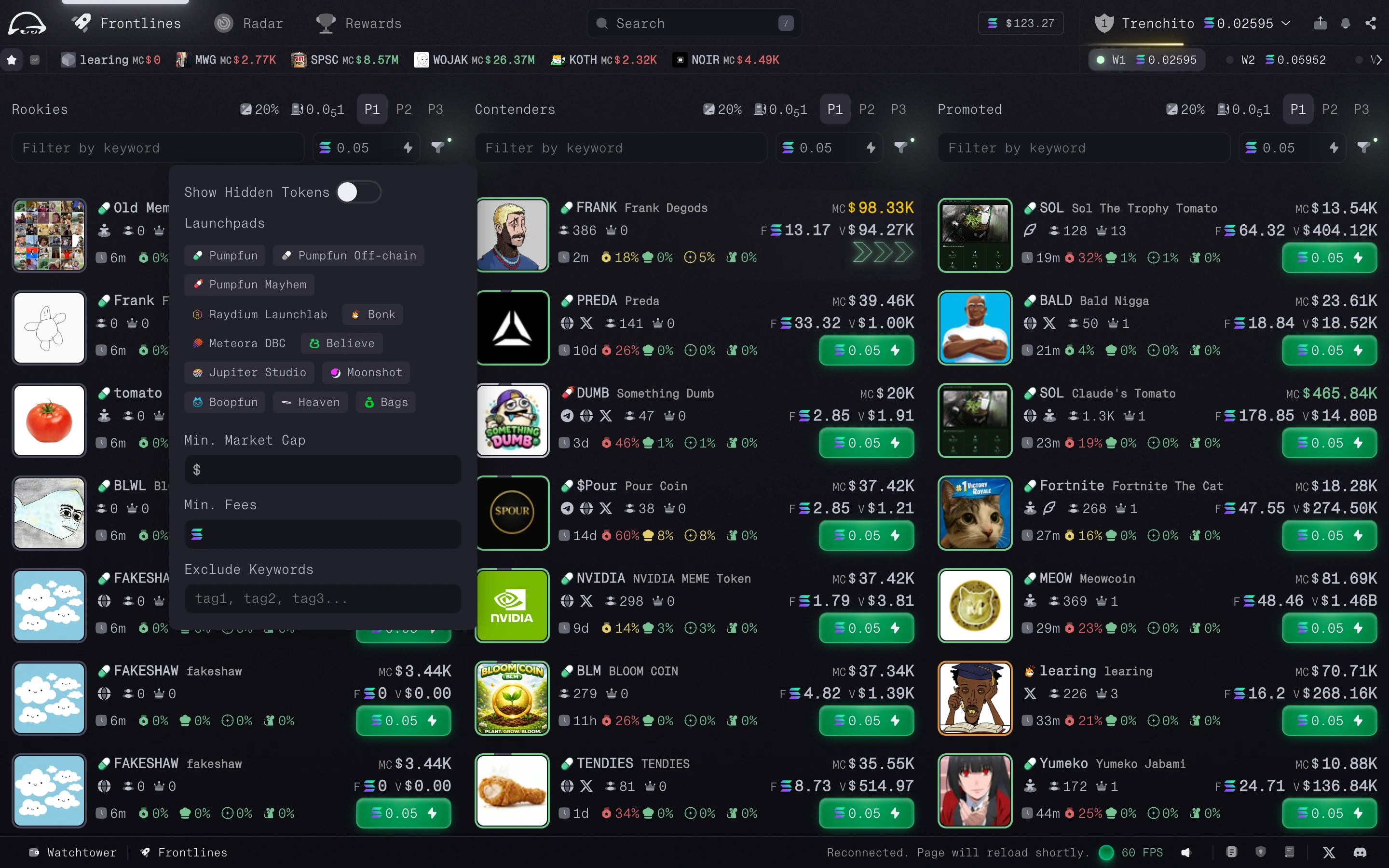
Frontlines is the launchpad discovery feed. It groups new and progressing tokens into clear stages so you can scan fast and deploy attention where it matters.
The Deployment Stages
Tokens are split into three sections:
1. Rookies
Newly created launchpad tokens appear here first.
- Use this section to catch tokens as early as possible.
- It is the fastest view, but also the noisiest.
2. Contenders
These tokens are further along and getting closer to completing their bonding curve.
- Use this section to identify tokens building momentum before migration.
- It is useful when you want launchpad exposure without only looking at the earliest mints.
3. Promoted
These tokens have completed their bonding curve and migrated.
- Use this section to track the first phase of post-migration trading.
Newesttokens are shown first so recent migrations are easy to spot.
Quick Buy
Each Frontlines table includes a lightning bolt button for Quick Buy.
- Use it to buy instantly with your saved execution settings.
- It is meant for fast entries when you do not want to open the full trading panel first.
Filtering the Noise
Frontlines includes filters to help remove obvious low-quality tokens and focus the feed on setups you actually want to review. You can change or disable them at any time.
Available filters include:
- Launchpad selection
- Minimum market cap
- Minimum fees
- Include and exclude word filters