
Market Orders
Last updated: 2026-03-12
Market orders execute immediately at the current market price. Use them when speed matters more than waiting for a specific entry or exit level.
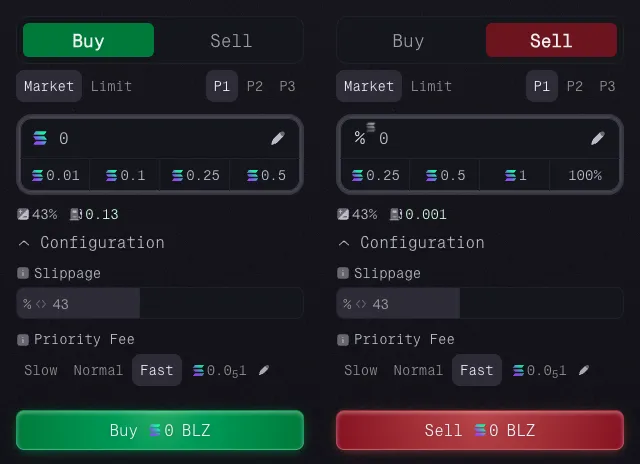
Three Presets
You can save up to three presets and switch between them depending on the setup you are trading.
Each preset saves:
- Quick buy and sell button values
- Slippage tolerance
- Priority fee settings
This lets you keep separate configurations for different trading styles without re-entering values mid-fight.
When To Use Market Orders
Market orders are usually the right choice when:
- you want to enter quickly,
- you need to exit immediately,
- the market is moving too fast for a resting order to be practical.
Quick Buy And Sell Buttons
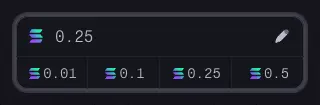
Each preset includes quick-action buttons that fill common buy or sell amounts with one click.
You can still enter a custom amount manually when needed.
Buy Orders: Set Your SOL Amount
For buys, enter the amount of SOL you want to spend. The order purchases as many tokens as that amount can buy at the current price.
Sell Orders: SOL Amount or Position Percentage
For sells, you can choose between two input modes:
- SOL value: enter how much SOL worth of the position you want to sell.
- Percentage: enter the percentage of the position you want to close, such as
50or100.

Order Settings
Below the amount input, you can review and adjust the active slippage and priority fee settings for the current preset.
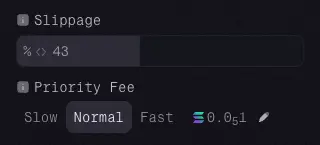
Slippage: Your Price Protection
Slippage controls how much price movement you are willing to accept between the quoted price and the executed price.
If the market moves beyond your slippage setting before the order executes, the transaction fails instead of filling at a worse price.
In general:
- Low volatility? Use 5-10% slippage
- High volatility? Bump it to 15-25%
- Absolute chaos? You might need even more
Priority Fees
Priority fees are paid to the Solana network, not to the platform. They affect how quickly your transaction is processed.
When the network is busy, higher priority fees can help prevent delays or timeouts. Each preset supports:
- Slow: cheapest, but your order might take longer to process
- Normal: balanced speed and cost for most situations
- Fast: higher cost for more urgency when the network is busy
You can also set a custom priority fee if needed.
Summary
Market orders are the fast execution path. Choose your amount, check your slippage and fee settings, and fire when timing matters more than exact price precision.
Next: learn about Limit Orders if you want to trade at a specific trigger level.