
Positions
Last updated: 2026-03-12
Track open and closed positions across wallets without losing sight of where your exposure sits. The positions views show what is still open, what has already been closed, and which wallet is carrying the position.
Three Ways to View Positions
1. The Subbar (Quick Access)
Use the switch in the subbar below the navbar to swap from tracked tokens to positions. This is the fastest way to check your active trades from anywhere on the platform.
From here you can:
- see live P&L updates,
- open any token page with one click,
- sell the full position quickly.

2. Open Positions (Token Page)
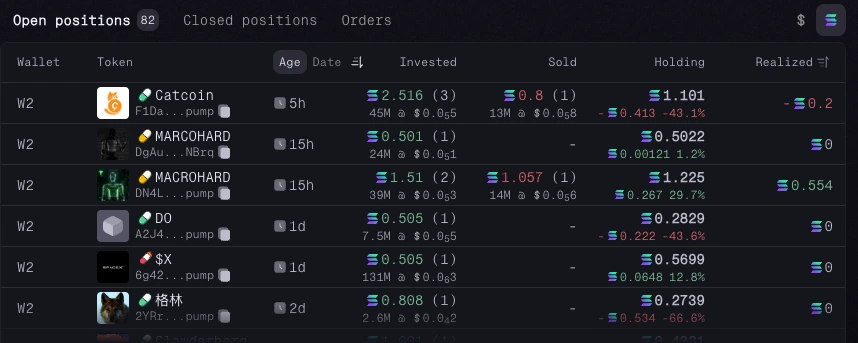
On any token page, the Open Positions table shows every wallet that currently holds that token. If you entered with multiple wallets, each one gets its own row so nothing is hidden inside an average.
Here’s what you can track:
- Age: how long you've held the position
- Amount Invested: your total capital deployed
- Amount Sold: what you've already taken off the table
- Current Holding Value: what your remaining tokens are worth now
- Unrealized P&L: paper gains or losses on unsold tokens
- Realized P&L: locked-in profits or losses from sells
This gives you a clean read on which wallet is performing well, which one needs attention, and how much exposure is still on the field.
Position Management
Without leaving the token page, you can:
- move tokens between wallets with distribute or consolidate,
- sell the full position in one action.
3. Closed Positions (Token Page)
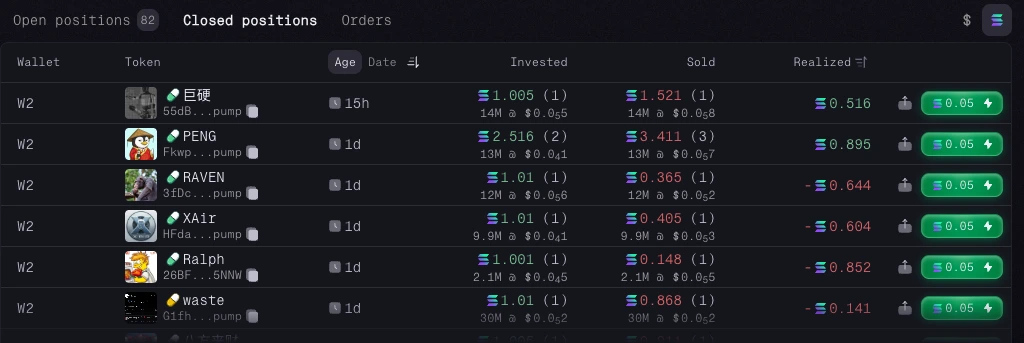
The Closed Positions table shows positions that have already been fully exited for that token. Use it to review how your trade played out and compare results across wallets.
If you want back in, you can reopen the position by entering a new buy amount directly from the table.
Summary
Multi-wallet tracking gets messy fast. This keeps it readable: every wallet, every position, and every P&L figure in one place so you can act without guessing.