
Wallets
Last updated: 2026-03-12
Manage operational wallets from your Profile Menu. Each wallet can be used independently, which makes it easier to separate strategies, split risk, and keep your setup disciplined.
Create Or Import Wallets
Create Wallet
Create a new operational wallet instantly. You can have up to 5 wallets total, including active and inactive ones. If the list is full, archive one before creating another.
Import Wallet
Import an existing wallet by providing its public and private keys so it can be managed as an operational wallet inside the app.
Individual Wallet Controls
For each operational wallet, you can:
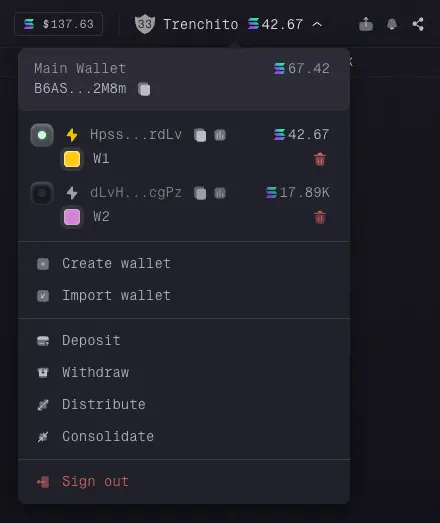
Toggle Active State
Turn a wallet on or off. Active wallets are available for trading.
Engage Turbo Mode
Enable Turbo Mode for that wallet when you want more aggressive trading behavior.
View Intel & Copy Address
View the public address, copy it, and review the wallet portfolio.
Customize Color
Assign a unique color to the wallet. That color is used across the app so its trades are easier to identify.
Rename On-the-Fly
Rename the wallet directly from the list to keep your setup organized.
Monitor SOL Balance
See its current native SOL balance.
Archive Wallet (Safeguarded)
Archive a wallet when you no longer want it in your active list. To reduce accidental removals, you need to press and hold the archive button until the confirmation bar fills.