
Profile
Last updated: 2026-03-12
Your profile area is the control point for account status, wallet access, and quick actions.
At the top-right of the screen, the profile bar shows:
- Your level and alias
- Your native SOL balance
- Your XP progress bar
- Quick actions such as sharing PnL, opening notifications, or copying your referral link

Profile Menu
Click the dropdown arrow to open the full menu and get to your wallet controls fast.
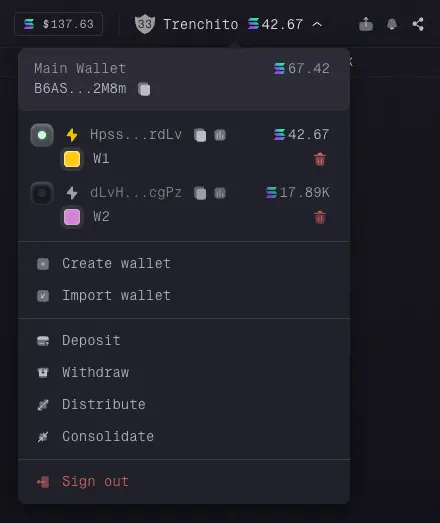
Main And Operational Wallets
The menu lists your main wallet and your operational wallets. For each operational wallet, you can quickly check:
- its state, including whether it is
Activeand whetherTurbo Modeis enabled, - its address,
- its SOL balance,
- actions to rename, recolor, or archive it.
Wallet Actions
This is also where you access the main wallet and fund actions: