
Tryhard Mode
Last updated: 2026-03-12
Tryhard Mode is a floating trading panel for fast buys and sells. It is designed for users who want execution controls visible at all times without relying on the sidebar.
Because the panel stays on screen and uses saved presets, it is faster to operate during fast-moving setups when hesitation costs entries.
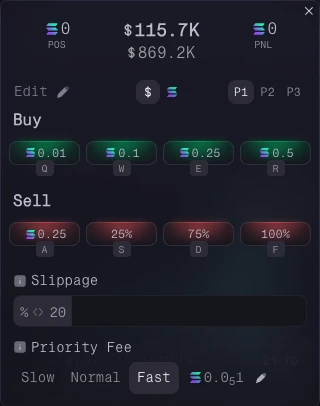
Presets
You can configure up to three presets. Each one includes:
- 4 buy buttons with preset SOL amounts
- 4 sell buttons using SOL amounts or percentages
- Custom slippage and priority fee settings
On-Panel Position Data
The panel also shows the token and position data you need while trading:
- Current token value in market cap or price terms
- Current holding value
- Unrealized P&L
Keyboard Shortcuts
Every button has a keyboard shortcut, so you can trade without moving away from the chart.
Setting Your Presets
Click Edit to turn the buy and sell buttons into input fields.
For sell buttons, click the SOL symbol or percentage symbol to choose the input mode.
Click Save when you are done.
Positioning & Control
You can drag the panel anywhere on screen and resize it to fit your setup.
Summary
Tryhard Mode is useful when fast repeated execution matters. Configure the presets once, keep the panel visible, and use it when you want less friction between the chart and the trade.